Managing a Property? Here’s How to Choose the Right Security Camera Upgrade
Not Every Property Needs the Same Security Upgrade
A residential building. A commercial property. A gated community.
Each has different layouts, daily activities, and security concerns.
So how do you know which security camera upgrade is right for your property?
The answer isn’t always installing more cameras.
Sometimes, improving coverage, upgrading outdated equipment, or adding smarter features can make a bigger difference.
Here are a few ProtectNet tips to help you decide.
1. Residential Buildings: Focus on Everyday Activity
Residents, visitors, deliveries, and maintenance staff move through your building every day.
Consider upgrading surveillance around:
- Main entrances and lobbies
- Package and delivery areas
- Parking garages
- Properties with suitable wireless network coverage
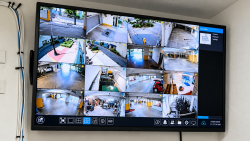
ProtectNet Tip: Look for blind spots and consider cameras with improved image quality or remote viewing capabilities to make everyday property monitoring easier.
2. Commercial Properties: Protect High-Traffic Areas
From customers and employees to vendors and deliveries, commercial properties experience constant activity.
A camera upgrade may be worth considering around entrances, loading docks, stockrooms, parking areas, and other important spaces.
ProtectNet Tip: Consider cameras with motion detection and compatible smart alerts to help management stay informed about activity in selected areas.
3. Gated Communities: Think Beyond the Main Gate
Larger properties often have multiple access points, shared amenities, parking areas, and long building perimeters.
One camera at the entrance may not provide the visibility your community needs.
ProtectNet Tip: Evaluate coverage at vehicle gates, pedestrian entrances, amenity areas, and other important locations. Depending on the property, higher-resolution cameras or specialized vehicle monitoring technology may be worth exploring.
4. Dark Areas: Consider Smarter Night Vision
Poor lighting can make surveillance more challenging, regardless of the property type.
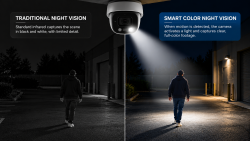
Modern cameras with motion-activated lighting can illuminate selected areas when movement is detected, helping compatible systems capture clearer color footage after dark.
ProtectNet Tip: Prioritize poorly lit entrances, parking areas, and building perimeters where additional nighttime visibility may be useful.
5. Existing CCTV? Upgrade Before You Replace Everything
Already have a surveillance system installed?
You may not need to start from scratch.
You may not need to start from scratch.
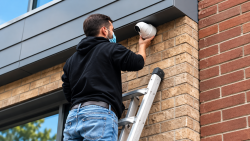
ProtectNet can arrange a site visit to assess your current cameras, recording equipment, cabling, and network infrastructure.
Depending on compatibility, our team can explore integrating existing equipment with newer cameras, improving coverage, or upgrading specific system components.
The goal is to recommend improvements that make sense for your property—not unnecessary replacements.
The Right Upgrade Starts with the Right Assessment
Whether you manage a residential building, commercial space, or gated community, your surveillance system should match how your property operates.
ProtectNet helps evaluate existing equipment, identify coverage needs, and plan professional CCTV installations, integrations, and upgrades.
Different properties. Different security needs. The right solution starts with a plan.
Not Sure Which Camera Upgrade You Need?
Let ProtectNet help you explore the right surveillance improvements for your property.
Request a CCTV Site Assessment or Service Consultation